
What’s New in RICOH CloudStream v2.6.0?
In this version, we added several new features, fixed some bugs, and made some improvements for Print&Scan, the new MFP is now supported, and following components are included.
| Version category | Version | Update | Detail |
| Release note version | v2.6.0 | ✓ | – |
| Component version (DM) | v1.3.1 | – | See the previous announcement (v2.5.1) |
| Component version (Print&Scan) | v3.49 | ✓ | See what’s new and release note below |
◆Common
・IM C320F support
- RICOH CloudStream now supports IM C320F for both DM and Print&Scan.
◆DM component(v1.3.1)
・IM C320F limitation *
- There is a limitation in that users cannot retrieve power usage information from Power Usage reports.
* Please note that the support for the new model mentioned above is not an update to the DM component itself, so there is no increment in the component version. Additionally, here is the information on the previous update. (URL).
◆Print&Scan component(v3.49)
・Self-registration for guest user
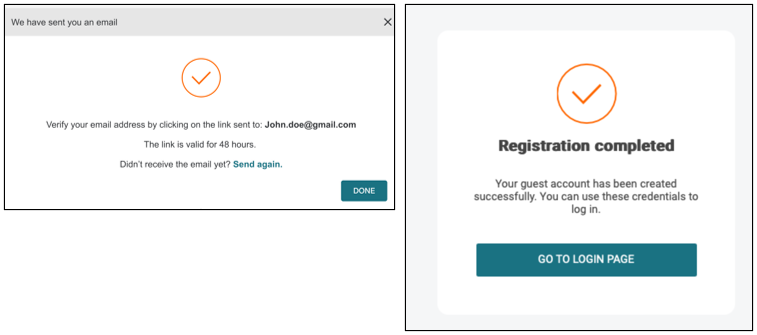
- Customers can provide access to guest users to submit and release print jobs without requiring them to download the mobile app. Guest accounts have an expiration date set and will be automatically deleted upon expiry, ensuring that customers can set their policy. Once activated, the guest users can immediately submit jobs via web upload, mobile app or PC Client and can login at the MFP to release their jobs.
・Mobile app release
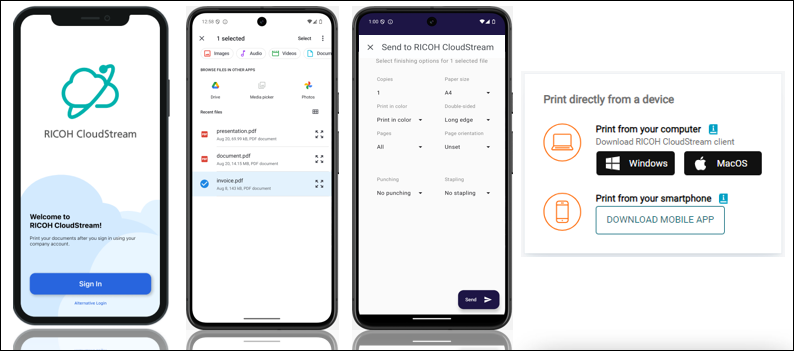
- A new branded RICOH CloudStream mobile app has become available with following functions.
- Setup the app via the QR code from Cloud Web
- Domain can be entered automatically by scanning QR code from Cloud Web
- Authenticate in mobile app via OAuth authentication
- Log in as a guest
- Upload jobs from mobile device
- Set basic finishing options while sending the document from mobile device
- Delete the job from mobile device
- See the job release history
- Customers can download the app from “My Document” page on PrintScan UI for customers’ tenants and RICOH application store for both iOS (URL) and Android (URL).
・Updates on “Overview” page on PrintScan UI
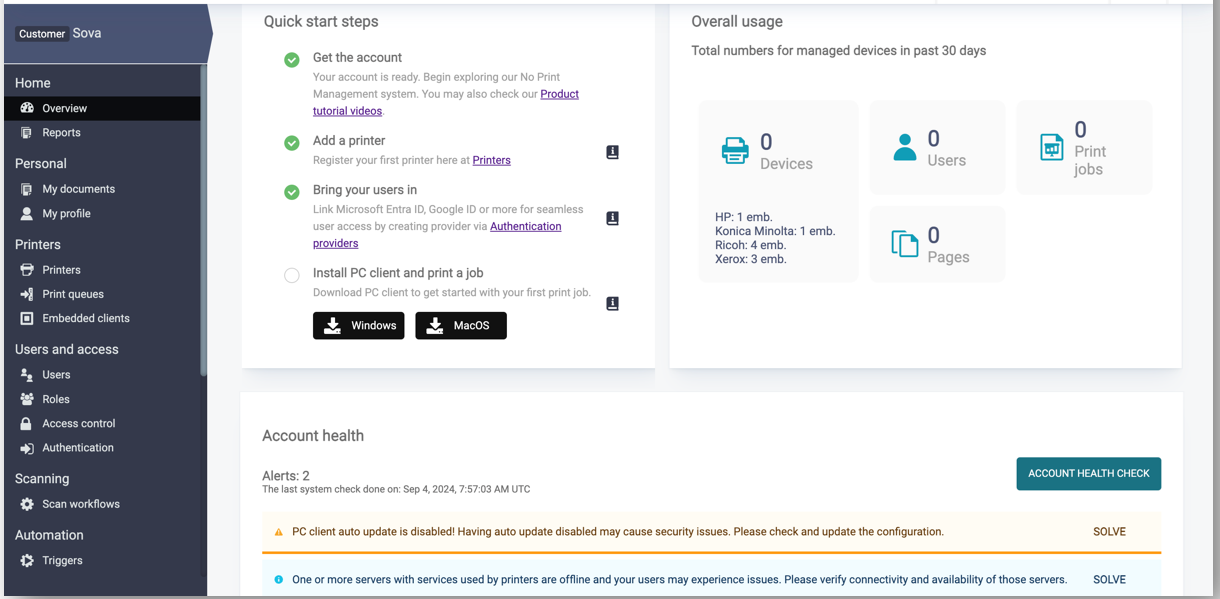
- The overview for customers has been enhanced. As well as key information on devices, users and print jobs, they can now see Pages and an overview of their embedded terminals.
・Updates on “Role” page on PrintScan UI
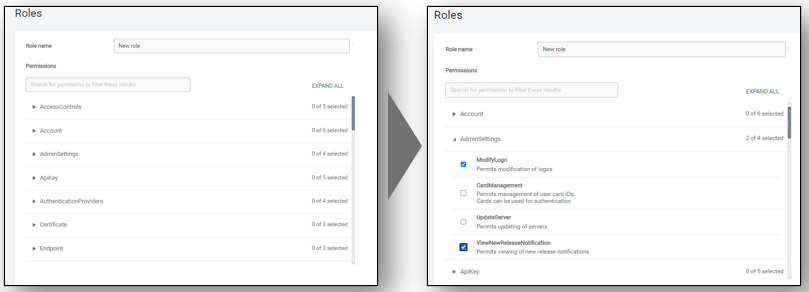
- It becomes easier to select the permissions on “Roles” page. The user experience has been greatly enhanced by logically grouping permissions, collapsable lists and a great search option to quickly get to where you need to. Check boxes and descriptions also make it easier to select and clearly see what the permission does and what level you want to apply (e.g., Create, Delete, Modify, View).
Release Notes
+ Added feature
x Improved/changed feature
– Bug fixed
! Limitation
◆DM component(v1.3.1)
Device Management
+ IM C320F is now supported.
Dashboard/Reporting
! Unable to retrieve power usage information from Power Usage reports.
System
No updates.
◆Print&Scan component(v3.49)
PrintScan UI
+ A new trigger is now available which forces all print to black & white. This trigger is disabled by default and ready for customers to simply enable or modify. This is available for all new customer accounts.
+ Guest user support
・Users can now self-register in the PrintScan UI.
・Guests can self-register for a temporary user account in the PrintScan UI.
x The page with triggers is now organized for better usability.
x The page with Access control is now organized for better usability.
x Changing the name of a print queue with pending print jobs in it no longer causes those jobs to disappear.
x PC Client auto-update tab now uses a more readable font.
– The account health section now correctly links to the PC Client section.
・Severity: C (administrator impact with a viable workaround)
・Root cause: Missing tests when the section was moved.
・Bug recurrence defense: Tests were added.
– Administrators are now able to authenticate again at a container level when using the container domain.
・Severity: C (administrator impact with a viable workaround)
・Root cause: Database changes in version 3.45
・Bug recurrence defense: Added tests to the standard test suite
Secondary Gateway
No updates.
PC Client
x PC Client auto-update improvements – newly created customers can also use the rollback option.
x You can now connect the PC Client in cloud storage mode to the secondary gateway with the “Enable secure login for session authentication types” option.
– PC Client no longer reports auto-update as failed in the configured “delay” update window.
・Severity: C (no user impact)
・Root cause: Unforeseen impact of the change.
・Bug recurrence defense: n/a
– PC Client can now be reinstalled in unattended mode. The “/S /UPGRADE=false” option no longer keeps the existing configuration file and correctly creates a new one.
・Severity: C (no user impact, viable workaround)
・Root cause: A different change caused this.
・Bug recurrence defense: Added to standard test scenarios.
Authentication
No updates.
Performance and security enhancements
x Updated 3rd party components to mitigate vulnerabilities.
x Various performance updates.
Printing
– PDF documents that were uploaded via API and have an internal /Rotate command are now printed correctly.
・Severity: B (medium user impact)
・Root cause: Unexpected PDF configuration
・Bug recurrence defense: n/a
– When scanning multiple pages with the Page separation processing step, the resulting pages now respect the requested resolution and are no longer significantly bigger.
・Severity: C (some user impact)
・Root cause: There was an unnecessary conversion as a middle step which was removed.
・Bug recurrence defense: n/a
Scanning
No updates.
Partner hosted and on-premises installations
No updates.
Ricoh Cloud Terminal (Gen2)
+ IM C320F is now supported.
Fujifilm BI Cloud Terminal (Gen2)
No updates.
HP Workpath Cloud Terminal (Gen2)
– Print jobs with booklet and center stapling finishing option when using cloud storage can now be released correctly.
・Severity: B (medium user impact)
・Root cause: Missing vendor-specific requirements
・Bug recurrence defense: Deeper external cooperation
Konica Minolta IWS Cloud Terminal (Gen2)
No updates.
Xerox Cloud Terminal (Gen2)
+ Users no longer need to manually deploy card plugin and card service for Versalink devices. This capability was added to the Terminal Deployment Tool.
x Stapling, folding, and punching are now supported.
Brother Embedded Terminal
No updates.
Canon Embedded Terminal
No updates.
HP OxPD Embedded Terminal
No updates.
HP Workpath Embedded Terminal
No updates.
Konica Minolta Open API Embedded Terminal
No updates.
Kyocera Embedded Terminal
No updates.
Lexmark Embedded Terminal
No updates.
Sharp Embedded Terminal
No updates.
API
x Print queues created by API are now enabled by default.
+ Account API was extended with new fields for page size, language, and color. The update option now contains the name and domain name. API responses were improved.
Chrome Extension
No updates.
Driver
No updates.
Installation (OVA file)
+ Rocky Linux 9 Software Appliance is now available on RICOH CloudStream Support site. Note: this will be also available in the Installations Files library in upcoming releases.
Internet ports
No updates.
Mobile app
+ New mobile app design
+ User-friendly interface
+ Easy to set and connect to your CloudStream account