
What’s New in RICOH CloudStream v2.3.0?
In this release, we added new features on Web UI and PC client, fixed some bugs, and made some improvements for Print&Scan and following components are included.
| Version category | Version | Update | Detail |
| Release note version | v2.3.0 | ✓ | – |
| Component version (DM) | v1.2.1 | – | See the previous announcement (v2.2.1) |
| Component version (Print&Scan) | v3.47 | ✓ | See what’s new and release note below |
◆DM component(v1.2.1)
・No update this time. Please check the previous release announcement. (v2.2.1)
◆Print&Scan component(v3.47)
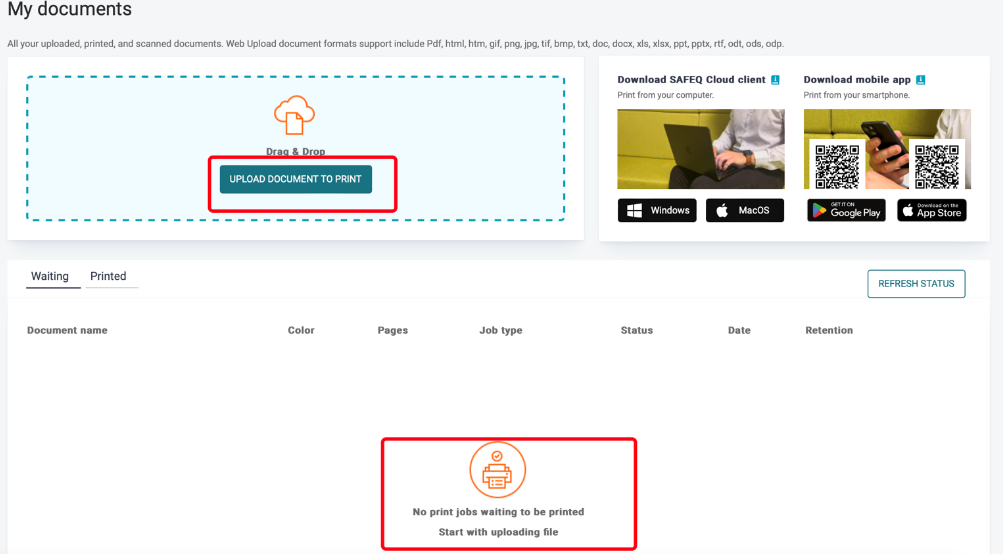
・Updates on Web UI (Web Upload):
-
- Users can now upload one or multiple documents directly to the PrintScan UI for printing without the need to install apps or clients.
Release Notes
+ Added feature
x Improved/changed feature
– Bug fixed
◆DM component(v1.2.1)
◆Print&Scan component(v3.47)
PrintScan UI
+ You can now set triggers to rotate a document by 90 degrees clockwise or counterclockwise.
+ Users can now upload documents to be printed in the PrintScan UI. This feature is no longer in the Early Access Program but available to all customers.
x The table with PC Client versions that facilitates the auto-update process is now improved.
x The button colors have been changed across the whole PrintScan UI.
x The Authentication provider name has been added to the Access tab in Scan Workflows.
x OIDC-only authentication is not supported with SAML without Service account authentication.
x Internal error page is no longer displayed after a failed login to RICOH CloudStream Device Management UI using OIDC.
– Fixed an issue that prevented creation of customer account with custom logo, resulting in an error and missing license.
– Localization to German has been improved.
– In Security > Certificates, the action icons stay grouped together even if you zoom the page.
– Fixed the slow loading and internal error on ‘My Documents’ and ‘Reports’ pages.
– Fixed the issue with missing permissions for default roles that occurred when migrating database from v3.35
– Fixed incorrect product name of CloudStream in Lexmark Printer administration.
Secondary Gateway
No updates.
PC Client
+ You can now set PC Client with local storage to send pull queue print jobs to cloud storage.
+ PC Client now contains a link to My profile in PrintScan UI.
– Added info to documentation that if you delete an account of a user who logged in to PC Client and didn’t log out, the user may still be able to perform user actions, such as print for up to 1 hour, due to caching on servers.
– The Client installer now writes JSON-compliant values to the json file, no longer causing parsing issues.
Authentication
No updates.
Performance and security enhancements
– Security has been improved for session user login.
Printing
– In the Universal Print Driver settings dialogue window, the arrow button to increase the size of the watermark is now above the arrow button to decrease the size.
Scanning
– New error codes have been added to help admins with troubleshooting.
– A scanned PDF/A document can now be opened in Adobe Acrobat without displaying the “Some characters may not display or print correctly” error.
Partner hosted and on-premises installations
No updates.
Ricoh Cloud Terminal (Gen2)
No updates.
Fujifilm BI Cloud Terminal (Gen2)
No updates.
HP Workpath Cloud Terminal (Gen2)
– Fixed the problem when multi-copy was not working on some HP printers.
– Booklet printing now works in the Download&Print scenario.
Konica Minolta IWS Cloud Terminal (Gen2)
– The terminal now supports Norwegian language.
– Registration expiration no longer blocks the whole terminal.
– IWS Marketplace versions can access settings via the header icon.
Brother Embedded Terminal
No updates.
Canon Embedded Terminal
No updates.
HP OxPD Embedded Terminal
No updates.
HP Workpath Embedded Terminal
No updates.
Konica Minolta Open API Embedded Terminal
No updates.
Kyocera Embedded Terminal
No updates.
Lexmark Embedded Terminal
No updates.
Sharp Embedded Terminal
No updates.
Xerox Embedded Terminal
No updates.
API
– Uploading print job to a non-existing input port via API no longer returns 200 instead of an error.
Chrome Extension
No updates.
Driver
No updates.
Mobile apps
x The Enforce tokens setting has been enabled for existing customers.
– BW print jobs are no longer accounted as color print jobs when submitted from the Mobile app.