
What’s New in RICOH CloudStream v2.0.0?
In the v2.0.0 release, we added new features, fixed some bugs, and made some improvements for DM and Print&Scan and following components are included.
| Version category | Version | Update | Detail |
| Release note version | v2.0.0 | ✓ | – |
| Component version (DM) | v1.2.0 | ✓ | See what’s new and release note below |
| Component version (Print&Scan) | v3.44 | ✓ | See what’s new and release note below |
◆DM component(v1.2.0)
・Integration between DM and Print&Scan:
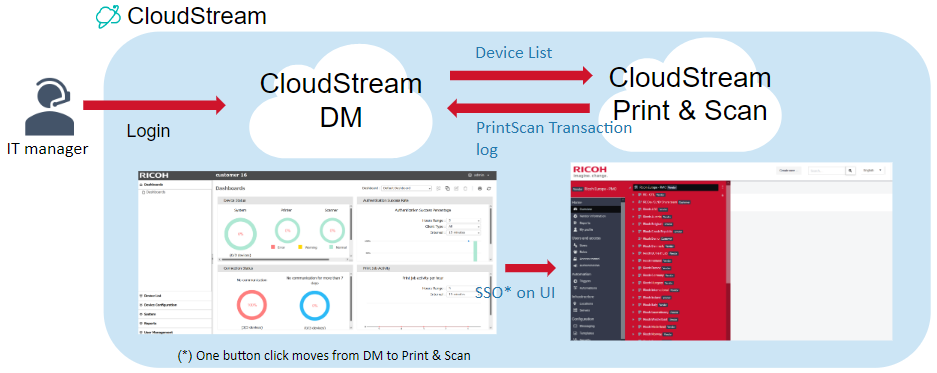
- Data is integrated between DM UI and PrintScan UI. For IT managers, the following features are available.
- Document usage related reports
- Print&Scan job activity dashboard
- User Management & Registration
- SSO (Single sign-on) is now available from DM UI to PrintScan UI.
・Gateway-less installation for Print&Scan embedded client:
- Print&Scan emb can be upgraded remotely, and IT managers can experience full cloud device management.
◆Print&Scan component(v3.44)
・Updates on PrintScan UI
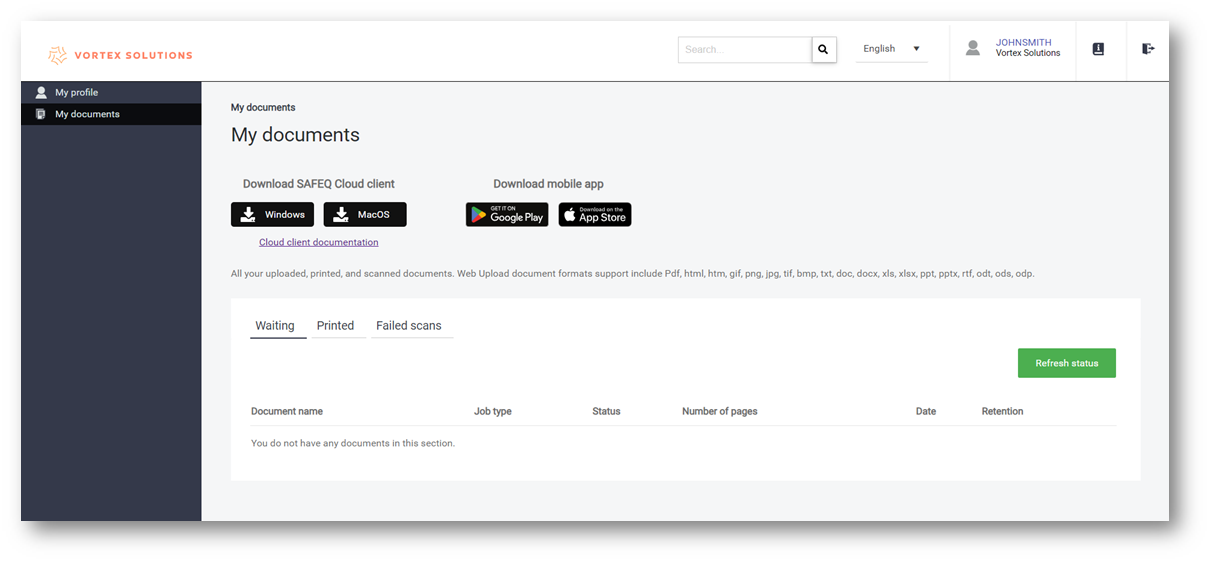
- My Profile, My Printers, My Documents, and My Authorizations have been consolidated into two sections (My Documents and My Profile) to improve user experience.
- For My documents page, users can see their pending and recently printed documents.
・Updates on Scanning
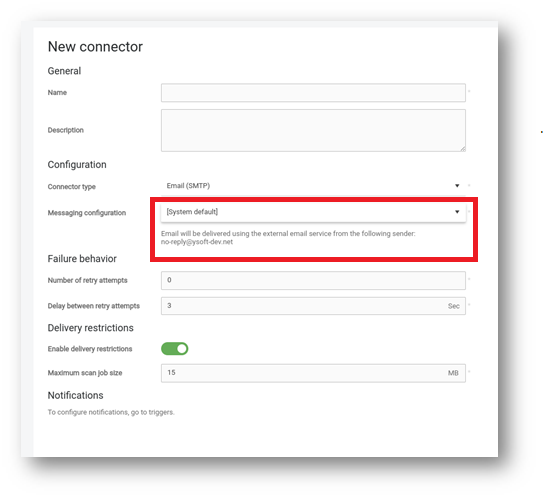
- E-mail setup is enhanced. SMTP configuration can be set up for scan workflows instead of default service. In this way, Users can set up own email address for delivery service.
Release Notes
+ Added feature
x Improved/changed feature
– Bug fixed
◆DM component(v1.2.0)
Device Management
+ Configuration for FAR (Flexible Admin Role) is available.
+ Zip file type of remote firmware update is available in deployment tool.
+ Minerva-MF4 and Metis-P4 are now supported.
Dashboard/Reporting
+ *Data is integrated between DM site and Print&Scan site.*Document usage related reports, Print&Scan job activity dashboard, User Management & Registration
+ A policy compliance dashboard is available.
+ Applied the new version policy and version info is shown in CloudStream DM UI.
+ Multiple tenant URLs are available for 1 tenant.
+ Extension of Trial/NFR license term is available.
x Product name and logo are shown in Web UI.
System
+ SP/UP reset after Print&Scan emb uninstall.
+ SSO is available from DM site to Print&Scan site.
+ An email is sent before licenses are expired.
+ Kerberos for Proxy Authentication is available.
◆Print&Scan component(v3.44)
Updates on PrintScan UI
+ The administrator can now see the cloud status and scheduled maintenance.
+ The user’s username is pre-filled in the OIDC provider’s authentication screen.
+ The administrator is notified about new CloudStream version in the Web UI.
x My Profile, My Printers, My Documents, and My Authorizations have been consolidated into two sections (My Documents and My Profile) to improve user experience.
– Fixed an issue where, in specific cases, emails were displayed incorrectly in the Web UI.
– Renamed the “Type of login” to include “Card”.
– With the CardManagement role, the users can now edit cards.
Secondary Gateway
No updates.
PC Client
– The Client no longer has connectivity issues on Mac after it wakes from sleep.
Authentication
No updates.
Performance
No updates.
Printing
– Documents are no longer printed in color if there is a trigger that sets them to B&W.
– All non-local users are now able to print by default.
Scanning
+ Customers can now use custom SMTP for scan workflows instead of a default service level configuration (Amazon SES or SendGrid).
Partner hosted and on-premises installations
No updates.
Ricoh Cloud Terminal (Gen2)
– The installation no longer fails on setting the SP options.
Fujifilm BI Cloud Terminal (Gen2)
No updates.
HP Workpath Cloud Terminal (Gen2)
No updates.
Konica Minolta IWS Cloud Terminal (Gen2)
x Auto color copy is now supported.
– Fixed the issue when the user could not log in again by card after timeout, not even after waiting for a few minutes.
Brother Embedded Terminal
No updates.
Canon Embedded Terminal
No updates.
HP OxPD Embedded Terminal
+ The administrator can now configure the terminal from a secondary gateway.
HP Workpath Embedded Terminal
+ Admin can configure the HP Workpath terminal from a secondary.
Konica Minolta Open API Embedded Terminal
x Auto color copy supported on the IWS terminal.
– Fixed the issue that the user can’t log in by card to the terminal after a timeout and some time period.
Kyocera Embedded Terminal
No updates.
Lexmark Embedded Terminal
No updates.
Sharp Embedded Terminal
– 4 hole punching is now working on all devices.
Xerox Embedded Terminal
No updates.
API
No updates.
Chrome Extension
No updates.
Driver
No updates.
Mobile apps
No updates.